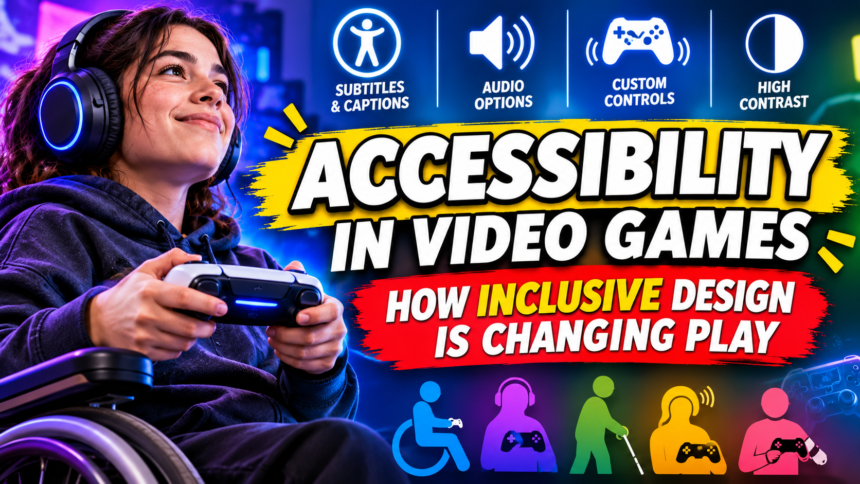

Accessibility in video games means designing games so that as many people as possible can play them, whatever their abilities. It has moved from an afterthought to a headline feature, and it often improves games for everyone. Here is what accessible design includes, why it matters and how to find it.
- What Does Accessibility in Video Games Mean?
- Why Accessibility Has Moved Into the Spotlight
- The Main Categories of Accessibility Features
- Examples of Accessibility Done Well
- Common Barriers That Still Exist
- Myths About Accessibility in Games
- What Developers Can Do
- What Players Can Do
- The Future of Accessible Gaming
- Frequently Asked Questions About Accessibility in Video Games
- Conclusion: Welcoming More Players Makes Better Games
What Does Accessibility in Video Games Mean?
Imagine a game you love, then imagine it with one small change. The text is too small to read, or the colours you must tell apart look identical, or a button combination requires a hand movement you cannot make. Suddenly the same game becomes a wall.
Accessibility is the practice of removing those walls. It is not about making games easy. It is about making sure that the people who want to play are able to try.
A Simple Definition
An accessible game offers ways for players with different physical, sensory, cognitive and situational needs to enjoy the experience. That can involve visuals, sound, controls, difficulty, reading and timing.
The goal is choice. Players should be able to adjust the game to fit their needs, instead of being forced into a single way of playing.
Who Benefits
Many people think of accessibility as relevant only to a small group. In reality, it touches a very large audience. Players with permanent disabilities benefit, but so do people with temporary injuries, ageing eyes or ears, tired minds, noisy rooms or one free hand because they are holding a child.
This idea is often described as situational disability. Almost everyone experiences limits on their abilities at some point, which is a strong reason to design flexibly.
Accessibility vs Difficulty
These two ideas are frequently confused. Difficulty concerns how hard the challenge is. Accessibility concerns whether a player can interact with the game at all.
A player may love hard games but need a different controller layout. Another may need clearer subtitles but want a tough fight. Keeping the concepts separate helps teams design better options and helps players ask for what they actually need.
Why Accessibility Has Moved Into the Spotlight
For a long time, options like these were rare, hidden or absent. Several changes brought them into the mainstream.
Players Spoke Up
Disabled gamers, advocates and community groups spent years explaining what was missing and sharing practical examples. Their voices, combined with detailed reviews and guides, made the issue difficult to ignore.
Many developers have said that learning directly from players changed how they think about design.
Industry Recognition
Major publishers and platform holders began to treat accessibility as a core part of quality. Some games became well known for their extensive option menus, and critics and players noticed.
This created a healthy sense of competition. Offering strong accessibility features became something studios could be proud of.
Hardware Innovation
Specialised hardware has also helped. Adaptive controllers, such as the Xbox Adaptive Controller released in 2018, allow players to connect their own switches, buttons and devices in a way that suits their bodies.
These products showed that custom play is not a niche idea but a design opportunity.
The Business Case
There is also a practical argument. A game that more people can play can reach a larger audience. Accessibility reduces refund requests, improves reviews and builds loyalty among players who feel welcome.
The ethical case is already strong, and the commercial case reinforces it.
The Main Categories of Accessibility Features
Accessibility is not one feature. It is a family of tools that address different needs.
Visual Accessibility
These features help players who are blind, have low vision or have colour vision differences.
- Colour-blind modes that adjust palettes so important signals can be told apart.
- Adjustable text size and clear, high-contrast fonts.
- High-contrast options that make objects stand out from the background.
- Screen readers and audio cues that describe menus and events.
- Reduced visual clutter for players who find busy screens overwhelming.
Hearing Accessibility
Players who are deaf or hard of hearing need information that does not depend on sound alone.
- Accurate subtitles with speaker names and sound descriptions.
- Visual indicators for off-screen threats and important noises.
- Separate volume controls for dialogue, music and effects.
- Haptic feedback that communicates events through vibration.
Motor and Physical Accessibility
These options help players who have limited movement, pain, tremors or fatigue.
- Remappable controls so every action can be placed where the player can reach it.
- Hold-to-toggle options that replace repeated pressing or long holding.
- Adjustable timing for quick-time events and button prompts.
- Aim assistance and auto-targeting to reduce precision demands.
- Support for adaptive hardware and alternative input devices.
Cognitive Accessibility
Cognitive needs are broad and include memory, attention, processing speed, reading ability and sensitivity to stress or overload.
- Clear, simple language in menus and instructions.
- Objective reminders and quest logs that restate what to do.
- Pause anywhere and the ability to take breaks without penalty.
- Adjustable pacing and options to reduce time pressure.
- Tutorial replays so players can revisit instructions at any time.
Sensory Comfort and Safety
Some players are sensitive to flashing lights, intense motion or loud sudden sounds. Options to reduce screen shake, limit flashing effects or soften sudden noises can make the difference between enjoyment and discomfort.
Quick Reference Table
| Area | Example feature | Who it helps |
|---|---|---|
| Vision | Colour-blind palettes, large text | Low vision, colour vision differences |
| Hearing | Subtitles with sound descriptions | Deaf and hard-of-hearing players |
| Motor | Remappable controls, toggles | Limited mobility, pain, fatigue |
| Cognitive | Quest reminders, pause anywhere | Memory, attention and processing needs |
| Comfort | Reduced screen shake, flash warnings | Motion sensitivity, photosensitivity |
Examples of Accessibility Done Well
Some projects are often held up as models for what thoughtful design looks like. Without turning this into a ranking, a few patterns stand out.
Comprehensive Option Menus
A few major releases have been praised for offering a huge range of settings, including detailed controls, audio cues and visual adjustments. The Last of Us Part II is widely cited as a landmark example, because it allowed players to tailor many aspects of the experience.
The key lesson is that thoroughness communicates respect. A long menu is not a burden when each option solves a real problem.
Smart Defaults
The best accessible design does not hide everything behind menus. Clear text, readable contrast and sensible controls from the start help everyone, including players who never open the settings screen.
Listening During Development
Some teams consult disabled players during development, testing early builds and adjusting features based on real feedback. This approach catches problems that designers without lived experience might miss.
Community Resources
Players and advocates also compile reviews and guides that describe how accessible particular games are. These resources help people decide what to buy and give developers clear signals about what matters.
Common Barriers That Still Exist
Progress is real, but many problems remain. Some of them are surprisingly basic.
Tiny or Unreadable Text
Text that looks fine on a large monitor can become impossible to read on a small screen or from across a room. Poor contrast and decorative fonts add to the problem.
Colour as the Only Signal
When a game uses only colour to indicate friend or enemy, safe or dangerous, some players cannot receive the information. A shape, icon, sound or pattern would solve the issue.
Forced Timing and Rapid Inputs
Quick-time events, rapid button mashing and precise timing can exclude players with limited dexterity. Offering alternatives, such as longer windows or holding instead of tapping, keeps the experience open.
Missing or Poor Subtitles
Subtitles that are too small, disappear too quickly or fail to describe important sounds leave deaf and hard-of-hearing players behind. Good subtitles are not a luxury, they are part of understanding the story.
Inaccessible Menus and Online Features
A game may be accessible during play but difficult to navigate in menus, or its online features may lack text chat support or reporting tools. Accessibility must cover the whole experience, not only the main gameplay.
Fear of Being Called Easy
Some developers hesitate because they worry that accessibility options will compromise their vision or draw criticism. In practice, optional settings do not reduce challenge for anyone who does not choose them.
Myths About Accessibility in Games
Misunderstandings slow progress, so they deserve direct answers.
Myth: Accessibility Ruins the Challenge
Optional features do not force anyone to use them. A player who wants the standard experience can keep it. Others can adjust the game so they can participate at all.
Myth: It Only Helps a Tiny Group
Because temporary and situational limits are common, many more people benefit than the label suggests. Subtitles are a familiar example, since a great many players use them in noisy rooms or while others are sleeping.
Myth: It Is Too Expensive
Some features are complex, but many are inexpensive when planned early. Adding remappable controls or scalable text during development is far easier than retrofitting them afterward.
Myth: It Is Only About Disabled Players
Inclusive design improves usability for everyone. Clear interfaces, flexible controls and readable text make games more enjoyable for a broad audience.
Myth Summary
- “It makes games easier.” It makes them reachable. Challenge remains a separate choice.
- “Few people need it.” Many people use at least one accessibility feature.
- “It costs too much.” Early planning keeps costs manageable.
- “It only helps disabled players.” Everyone benefits from clear, flexible design.
What Developers Can Do
For studios of any size, a thoughtful approach can start with a few concrete steps.
Step-by-Step Approach
- Plan accessibility from the beginning. Decisions made early are cheaper and more effective than patches added later.
- Offer remappable controls. Allow players to assign any action to any input.
- Never rely on a single sense. Pair colour with shape, and sound with a visual cue.
- Provide excellent subtitles. Use clear sizes, good contrast and descriptions of important sounds.
- Make text scalable and readable. Test on small screens and at a distance.
- Include optional timing and assist features. Let players adjust how demanding the game is physically.
- Test with disabled players. Invite feedback and act on it.
- Communicate clearly. Publish a list of accessibility features so players can make informed decisions.
- Keep improving. Treat accessibility as a continuing process, not a one-time checkbox.
Small Studios and Limited Budgets
A small team cannot do everything, but it can do important things. Readable text, remappable controls and subtitles are often achievable and have a major effect. Being honest about what is and is not supported also builds trust.
Learning From Existing Guidelines
Several community and industry groups publish practical guidelines that describe common features and best practices. Using them as a checklist helps teams avoid starting from scratch.
What Players Can Do
Players also have a role in shaping a more inclusive industry.
Check Before You Buy
Look for accessibility information on store pages, in reviews or in community guides. A few minutes of research can prevent frustration and wasted money.
Explore the Settings Early
Many players never open the options menu, yet it may contain exactly what they need. Spending a few minutes there at the start can change the whole experience.
Give Constructive Feedback
If a game lacks a feature, say so clearly and politely. Specific suggestions, such as asking for a toggle option or larger subtitles, are more helpful than general complaints.
Support Inclusive Games
Buying and recommending games that take accessibility seriously sends a message that it matters. Positive attention encourages studios to continue.
Be a Good Community Member
Respect people who use assist features. How someone chooses to play does not take anything away from anyone else.
The Future of Accessible Gaming
The field is moving quickly, and several developments are worth watching.
Standard Features Becoming Normal
Options that were once rare are increasingly expected. Remappable controls, subtitle settings and colour-blind modes are becoming baseline features, which is an encouraging sign.
Better Hardware and Software Support
Platforms continue to add system-level tools such as global controller remapping, screen readers and captions. When these exist at the system level, games can build on a stronger foundation.
Voice, Eye Tracking and New Inputs
New input methods, including voice commands and eye tracking, open further possibilities. As they mature, they may allow more people to play in ways that suit their bodies.
A Cultural Shift
Perhaps the biggest change is cultural. As more people talk about accessibility as part of quality, it becomes harder to treat it as optional. The goal is for inclusive design to be the default way games are made.
Frequently Asked Questions About Accessibility in Video Games
What is accessibility in video games?
It is the design of games so that people with different abilities and needs can play them. This includes visual, hearing, motor and cognitive options.
Does accessibility make games easier?
Not necessarily. Accessibility focuses on whether players can interact with the game at all. Difficulty is a separate setting that players can choose independently.
Who uses accessibility features?
Players with permanent disabilities, temporary injuries and situational limits all use them. Many people use features such as subtitles or remapped controls simply because they are more comfortable.
What are some common accessibility options?
Common options include remappable controls, subtitles, colour-blind modes, adjustable text size, hold-to-toggle settings, aim assistance and the ability to adjust timing.
How can I find out whether a game is accessible?
Check the store page, read reviews that mention accessibility, and look for community guides that describe a game’s features in detail. Many studios also publish a list of supported options.
Is accessibility expensive for developers?
It can be, particularly if added late. Planning from the start and focusing on essential features keeps costs more manageable.
What is an adaptive controller?
It is a device designed to let players connect custom switches, buttons and other inputs so they can play in a way that fits their bodies. It expands the ways people can use consoles and computers.
How can I support better accessibility in games?
Buy and recommend inclusive games, give clear and respectful feedback, and share information about what works well. Public attention encourages studios to improve.
Conclusion: Welcoming More Players Makes Better Games
Accessibility in video games is about opening doors, not lowering standards. Thoughtful options for vision, hearing, movement and thinking allow more people to enjoy the art form, and many of those options improve the experience for everyone.
The practical takeaway: developers should plan inclusive design early, and players should look for, use and support it. When a game welcomes more people, the whole medium grows stronger.